
Geo Controller integrates with Yoast SEO, allowing you to use geographic information from your visitors directly within supported Yoast SEO title and meta description fields.
By combining Geo Controller’s IP geolocation data with Yoast SEO’s replacement variable system, you can generate location-aware metadata using familiar variables such as %%country%%, %%city%%, and %%region%%.
This feature offers additional flexibility for geographic content personalization. However, location-dependent metadata requires careful configuration, especially on websites targeting organic search traffic.
How the Integration Works
Geo Controller automatically registers additional replacement variables using Yoast SEO’s supported variable registration system.
These variables are based on available geographic data returned by the Geo Controller API.
When Yoast SEO processes a supported field containing one of these variables, the placeholder can be replaced with the corresponding geographic value.
For example, %%country%% may be replaced with United States for a visitor detected in the United States, or United Kingdom for a visitor detected in the United Kingdom.
Not every Geo Controller API property is registered as a Yoast variable. Certain internal, technical, and status-related properties are intentionally excluded.
How to Enable Geo Controller with Yoast SEO
- Install and activate Yoast SEO.
- Install and activate Geo Controller.
- Ensure that the relevant plugin integration is enabled in the Geo Controller Settings.
- Open a WordPress post or page and locate its Yoast SEO settings.
- Enter a supported Geo Controller variable into the SEO title or meta description field.
- Save your changes and inspect the generated page metadata.
You can also use replacement variables in supported Yoast SEO templates, depending on the field and content type.
Available Geographic Variables
Geo Controller provides additional variables alongside Yoast SEO’s standard snippet variables.
Some useful examples include:
| Variable | Description |
|---|---|
%%country%% |
Detected visitor country name. |
%%country_code%% |
Two-letter country code. |
%%city%% |
Detected city name. |
%%region%% |
Detected region or state. |
%%continent%% |
Detected continent name. |
%%currency%% |
Currency code associated with the detected location. |
The actual value depends on the information available from Geo Controller for the current request.
For additional geographic properties, visit the Geo Controller Tags documentation.
Note: The complete list of general Geo Controller tags is not identical to the variables available in Yoast SEO. Some properties are excluded from this integration, and variables that conflict with existing Yoast registrations may not be available.
Using Geographic Variables in Yoast SEO
Geo Controller variables can be combined with ordinary text and Yoast SEO’s existing replacement variables.
Example: Geographic SEO Title
Suppose you operate a business providing services internationally.
You could enter the following title template:
Our Services in %%country%% | Example Company
For a request where Geo Controller detects United States, the resulting title may be:
Our Services in United States | Example Company
Example: Geographic Meta Description
You can also use geographic variables within a meta description:
Explore our products and services available to customers in %%country%%. Contact our team to learn more.
If Geo Controller detects United States, Yoast SEO may generate:
Explore our products and services available to customers in Serbia. Contact our team to learn more.
These examples demonstrate variable replacement. They do not guarantee that search engines will index or display every geographic variation.
Yoast SEO Settings Example
The screenshot below illustrates how Geo Controller geographic variables can be used alongside standard Yoast SEO variables.
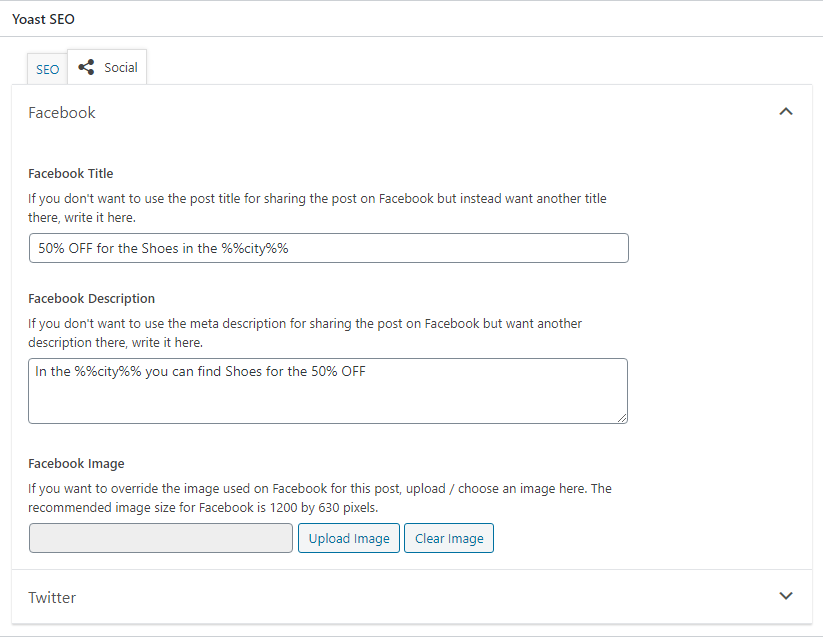
The exact Yoast SEO interface may differ depending on your installed version. You may need to enter Geo Controller variables manually rather than selecting them from Yoast’s built-in variable suggestions.
Important SEO Considerations
Geographic metadata personalization is not the same as an international SEO strategy.
Search engines may crawl your website from locations that differ from those of your intended audience. As a result, they may encounter only one geographic variation of your page’s metadata.
For example, a search engine crawler connecting through a United States IP address may receive metadata intended for United States visitors, even if your website also generates different metadata for visitors from Europe.
This means that using geographic variables does not guarantee improved rankings or country-specific search engine listings.
Google Search and Geographic Content
Google recommends using accessible, locale-specific URLs and appropriate hreflang annotations when websites need distinct regional or language versions of their content.
IP-based metadata personalization alone is not a substitute for these practices.
For additional guidance, see Google’s documentation on locale-adaptive pages.
Avoid Misleading Metadata
Geographic variables should only be used where the resulting metadata accurately describes the content available on the page.
For example, displaying a country-specific service title is inappropriate if the business does not actually provide that service in the selected country.
Do not use this functionality to deliberately show misleading content to search engines or create geographic claims that the page cannot support.
Page Caching and Dynamic Metadata
Geo Controller’s Yoast SEO integration generates replacement values during WordPress processing.
If a caching plugin, reverse proxy, or CDN stores the generated HTML, subsequent visitors may receive the same cached SEO metadata regardless of their individual location.
For example, a page cached with a title containing United States may continue serving that title to visitors from other countries until the cache is refreshed or otherwise separated by location.
Geo Controller variables registered with Yoast SEO do not independently bypass full-page caching or automatically create separate cached versions for each country.
Review your caching configuration before enabling location-dependent metadata on production pages.
Social Media Sharing and Link Previews
Yoast SEO can generate metadata used by social platforms, including Open Graph information.
However, social media platforms generally retrieve page information using their own automated crawlers.
As a result, location-dependent metadata may reflect the crawler’s detected location rather than the location of the person sharing the link or the person viewing it.
Social platforms may also cache previously retrieved metadata, so geographic variations are not guaranteed to appear in individual link previews.
If consistent social sharing titles and descriptions are important, consider using stable metadata rather than relying on visitor-specific geographic variables.
Privacy and Sensitive Information
Not every geographic or technical property is appropriate for public SEO metadata.
Avoid inserting visitor IP addresses, precise coordinates, network identifiers, or other potentially sensitive information into titles, descriptions, and social metadata.
For general SEO use, broad geographic information such as a country or region is usually more appropriate than individual visitor identifiers.
Recommended Best Practices
- Use geographic variables only where they provide accurate and relevant information.
- Prefer stable SEO titles and descriptions for important organic search landing pages.
- Use dedicated regional URLs and
hreflangwhere appropriate for international SEO. - Verify the generated HTML metadata rather than relying exclusively on the Yoast editor preview.
- Check the effects of page caching and CDN configuration.
- Test how social media crawlers retrieve and cache page metadata.
- Avoid including sensitive visitor information in public metadata.
- Do not assume that geographic personalization will improve search rankings.
For Developers
The integration uses Yoast SEO’s wpseo_register_extra_replacements action and registers supported Geo Controller API properties through wpseo_register_var_replacement().
Developers can customize the excluded property list using the cfgeo_wpseo_excluded WordPress filter.
Changing the exclusion list requires understanding the format of Geo Controller API data, Yoast SEO replacement variable naming rules, and the implications of exposing dynamic information in public metadata.
For technical information about accessing Geo Controller data directly, see the PHP Integration documentation.
Related Documentation
- Geo Controller Tags
- PHP Integration
- Yoast SEO Replacement Variables
- Google: Managing Multi-Regional Websites
Important: Geo Controller provides geographic replacement variables as an optional customization tool. Incorrect or misleading metadata, inadequate caching configuration, or poorly planned geographic targeting can negatively affect how search engines and social platforms interpret your pages. SEO improvements are not guaranteed.