
Payments Control allows WooCommerce store owners to manage the availability of existing payment methods based on the customer’s country.
With Geo Controller, you can configure geographic restrictions for individual WooCommerce payment gateways without creating separate stores for different markets.
This is particularly useful for international businesses working with regional payment providers or offering different payment options across multiple countries.
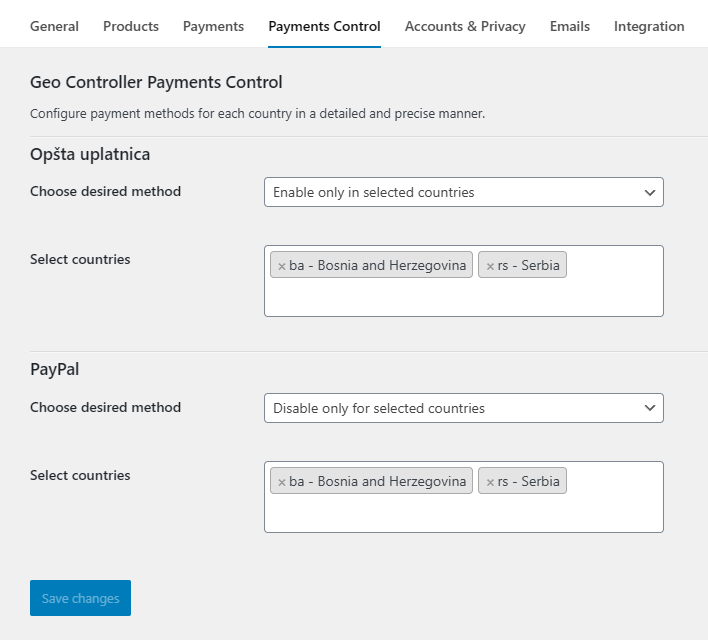
How Payments Control Works
Geo Controller integrates with WooCommerce’s existing payment gateway availability system.
After configuring your WooCommerce payment methods, the available enabled gateways can be configured under the Payments Control settings tab.
Each gateway can have its own geographic rule, allowing different payment options to be made available to customers from different countries.
Important: Geo Controller does not install payment gateways, process transactions, or override restrictions imposed by your payment provider.
Where to Find Payments Control
- Open your WordPress administration dashboard.
- Navigate to WooCommerce → Settings.
- Select the Payments Control tab.
- Locate the payment method you want to configure.
- Select the desired restriction rule and countries.
- Save your changes.
Configuring and saving geographic payment restrictions requires an eligible Geo Controller license or an available development configuration.
Payment Control Options
WooCommerce Default
Leave the payment method controlled by WooCommerce and the payment gateway’s own availability rules.
Geo Controller does not apply an additional geographic restriction to that gateway.
Enable Only in Selected Countries
Make the payment method available only to customers whose country matches one of the selected countries.
For example, you can configure a regional payment gateway to appear only for customers in Nigeria and South Africa.
Customers outside the selected countries will not be offered that gateway through WooCommerce’s filtered list of available payment methods.
Disable Only for Selected Countries
Exclude a payment method for customers from the selected countries.
For example, if a gateway does not support a particular market, you can configure Geo Controller to remove it from the available payment options for that country.
Select Countries
Each supported payment method includes a country selection field.
Select the countries to which the configured rule should apply.
If no valid countries are selected, Geo Controller does not apply an additional geographic restriction for that gateway.
Practical Example
Consider an online store serving Germany, Nigeria, and South Africa.
- Gateway A: WooCommerce Default – Use the gateway’s existing availability rules.
- Gateway B: Enable only in selected countries – Nigeria and South Africa.
- Gateway C: Disable only for selected countries – Germany.
These rules are evaluated independently for each payment gateway.
Actual payment availability still depends on the payment provider’s supported countries, currencies, customer requirements, and merchant account configuration.
How Is the Customer’s Country Determined?
Geo Controller can use location information associated with the current WooCommerce checkout, including submitted country information, the WooCommerce customer session, and IP-based geolocation data.
Checkout and customer billing information may differ from the country detected through the visitor’s IP address.
The exact source available depends on the checkout implementation and the current customer session.
Always test geographic payment rules with both guest customers and logged-in customers, particularly when customers change their billing country during checkout.
Classic Checkout and Checkout Blocks
Geo Controller uses WooCommerce’s available payment gateways filtering system to control which methods can be offered.
This filtering mechanism is also used by supported WooCommerce Store API and Checkout Blocks integrations.
However, each payment gateway must support the checkout implementation being used by your store.
Some express-payment integrations render their own buttons outside the standard checkout payment method list. These integrations may require additional testing because their frontend behavior can differ from ordinary WooCommerce gateways.
Important Limitations
- Geographic payment rules control gateway availability, not payment processing.
- IP geolocation is approximate and does not verify a customer’s legal residence.
- Payment providers may impose additional country, currency, or account restrictions.
- Gateway restrictions are not a substitute for legal or regulatory compliance verification.
- Customers may change their billing or shipping country during checkout.
- Frontend express-payment buttons may behave differently from standard checkout payment methods.
Testing Payment Restrictions
Before enabling Payments Control on a production store, verify the following:
- Allowed countries can access the expected payment methods.
- Restricted countries cannot access excluded methods through the normal checkout flow.
- Changes to the billing country are reflected correctly in payment availability.
- Guest and logged-in customers receive the intended options.
- Classic Checkout and Checkout Blocks behave as expected.
- Express-payment buttons follow the intended restrictions where supported.
- Customers in supported markets still have an available payment method.